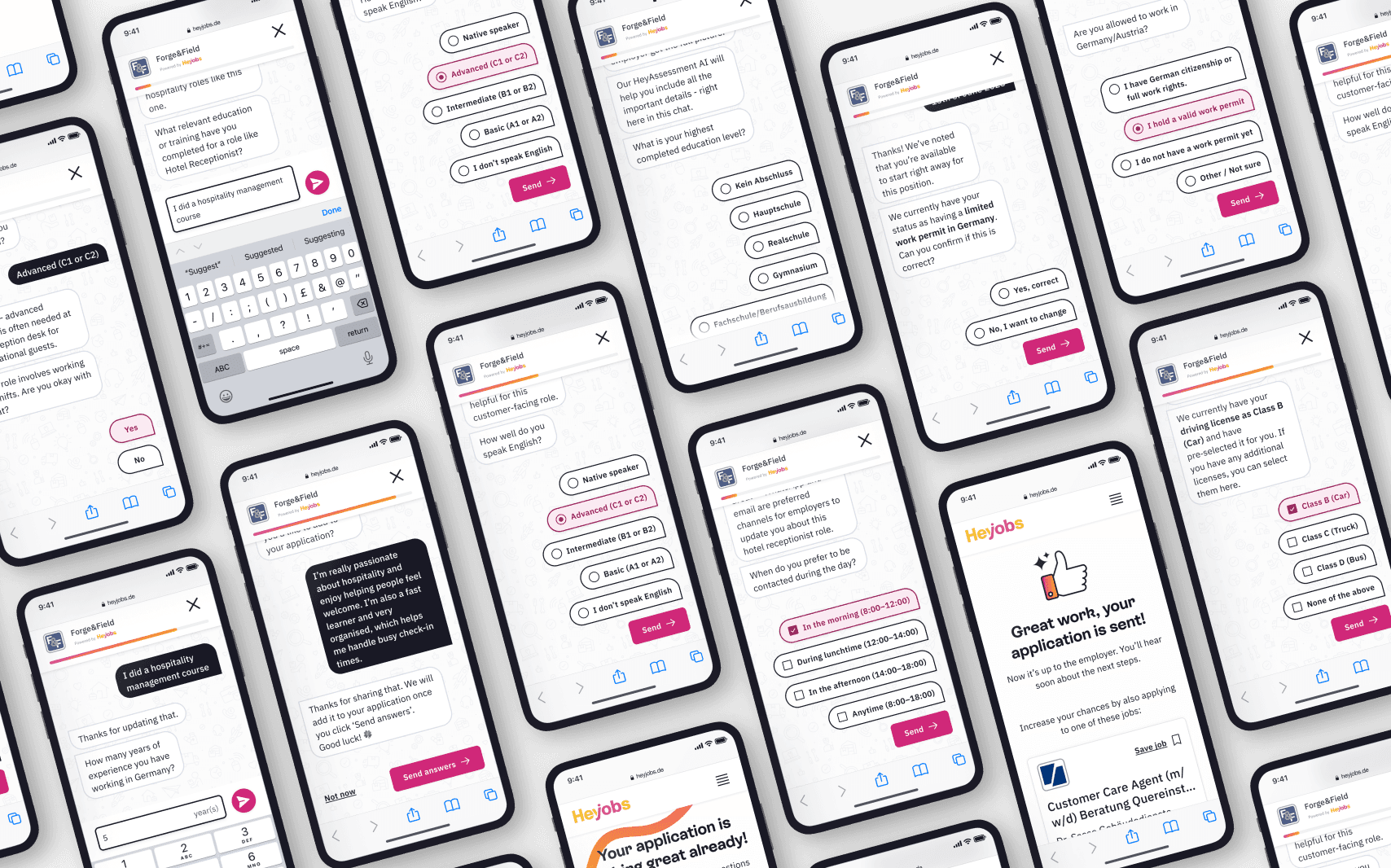
Conversational AI interface for job application screening

Conversational AI interface for job application screening

Solving recruiter overwhelm and talent invisibility by transforming how job applications are screened and qualified.

Role

Lead Designer

Scope

End-to-end: Concept to Delivery

Launch

Pilot → 100% in 2 mos.

Company

HeyJobs

Overview

tl;dr

HeyAssessment is an AI-powered conversational chat that enriches job applications after submission. It asks job-specific follow-up questions - adapting to each role, skipping what's already known, and probing deeper on open-ended answers - turning sparse applications into structured profiles. Launched under extreme time pressure, we shipped without formal user testing to capture immediate business impact, then iterated post-launch.

Key Impact

Key Impact

+50%

Interview rate for completed assessments

+30%

Higher hire rate for completed assessments

81%

Assessment completion rate

38%

Faster
time-to-hire

Faster time-to-hire

Context

Why Assessment?

"Creating a better future for businesses and talent - one hire at a time."

"Creating a better future for businesses and talent - one hire at a time."

HeyAssessment was designed to improve hiring success by ensuring that candidates who are qualified, interested, and reachable are accurately presented to recruiters. While we couldn't change a talent's qualifications, our primary goal was to ensure they are effectively captured, structured, and supplemented with job-specific information to reduce recruiter screening efforts.

For Recruiters

Enhances candidate qualification, filters for genuine interest to reduce ghosting, and automates pre-screening to maximise efficiency.

Enhances candidate qualification, filters for genuine interest to reduce ghosting, and automates pre-screening to maximise efficiency.

For Talent

Offers a way to stand out via a well-structured document, ensures faster recruiter feedback, and provides clarity on job fit through specific assessment questions.

Offers a way to stand out via a well-structured document, ensures faster recruiter feedback, and provides clarity on job fit through specific assessment questions.

As Principal Designer, I led the design of the HeyAssessment chat interface, owning the full design process from concept through delivery.

PROBLEM

A Two-Sided Challenge

Recruiters faced overwhelming numbers of unqualified applicants and struggled to reach quality candidates due to missing contact details, incomplete profiles, and skill mismatches. Candidates reported slow processes, lack of communication, and frequent ghosting.

The opportunity: collect richer, more useful information right after someone applies, specific to the job they applied for, in a way that feels like a natural next step, not another form.

Unqualified volume
Unqualified volume

Recruiters were overwhelmed by number of unqualified applicants and struggled to reach candidates due to missing contact details.

Recruiters were overwhelmed by number of unqualified applicants and struggled to reach candidates due to missing contact details.

Slow process & ghosting

Candidates reported slow hiring processes, lack of communication on the status of their application and frequent ghosting.

Candidates reported slow hiring processes, lack of communication on the status of their application and frequent ghosting.

Skills mismatches
Skills mismatches

Without structured pre-screening, skill mismatches were only discovered at the interview stage - wasting time for both sides.

Without structured pre-screening, skill mismatches were only discovered at the interview stage - wasting time for both sides.

Users

HeyAssessment had to work for two very different audiences.

User

What they need

User

What they need

Talent

A fast, low-friction experience thay can complete on their phone. Many are not tech savvy. They've just applied for a job - they're motivated, but their patience is limited.

Talent

A fast, low-friction experience thay can complete on their phone. Many are not tech savvy. They've just applied for a job - they're motivated, but their patience is limited.

Recruiters

Structured, decision-ready information about each candidate. Clear signals: does this person have the right work permit? The right language level? Relevant experience?

Strategic challenge

Deliver measurable business impact through better data. We prioritised speed and automation to deliver immediate ROI, opting for rapid deployment over upfront validation.

Increased hiring volume
Reduced cost-per-hire
Recruiter efficiency

For the candidate experience, the focus was on user friendly design - creating a streamlined, frictionless path to completion.

Process

Tone of Voice & Branding

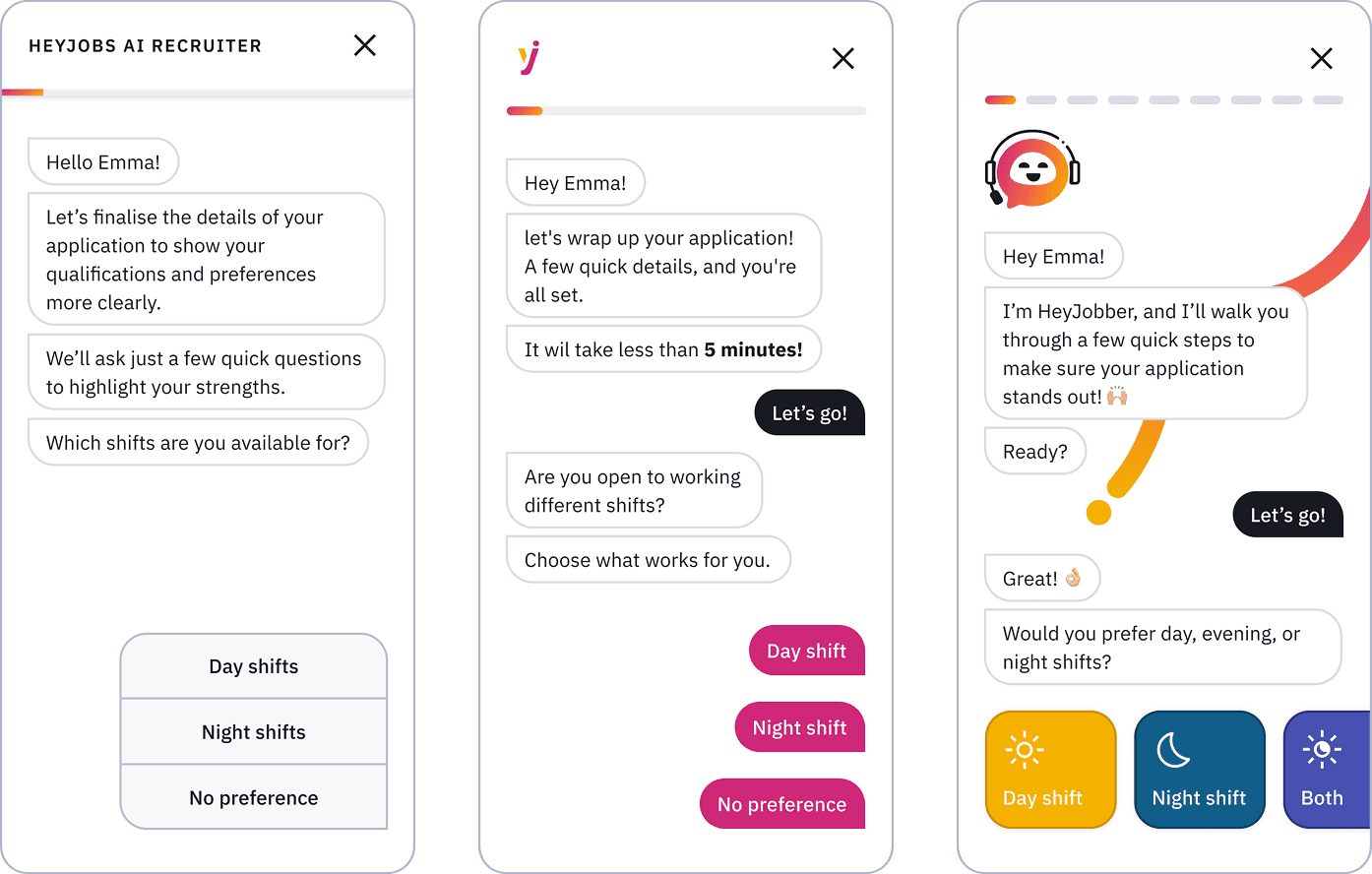
I explored multiple brand directions and narrowed them down to three finalists. Route 1: AI Recruiter leaned professional and functional; Route 2 - HeyJobs Assistant was effortless and friendly; Route 3: HeyJobber was engaging and playful. Route 2 was recommended to stakeholders - it struck the right balance between approachability and trust, and aligned with HeyJobs' existing brand voice, which had already been validated with users.
Wireframes

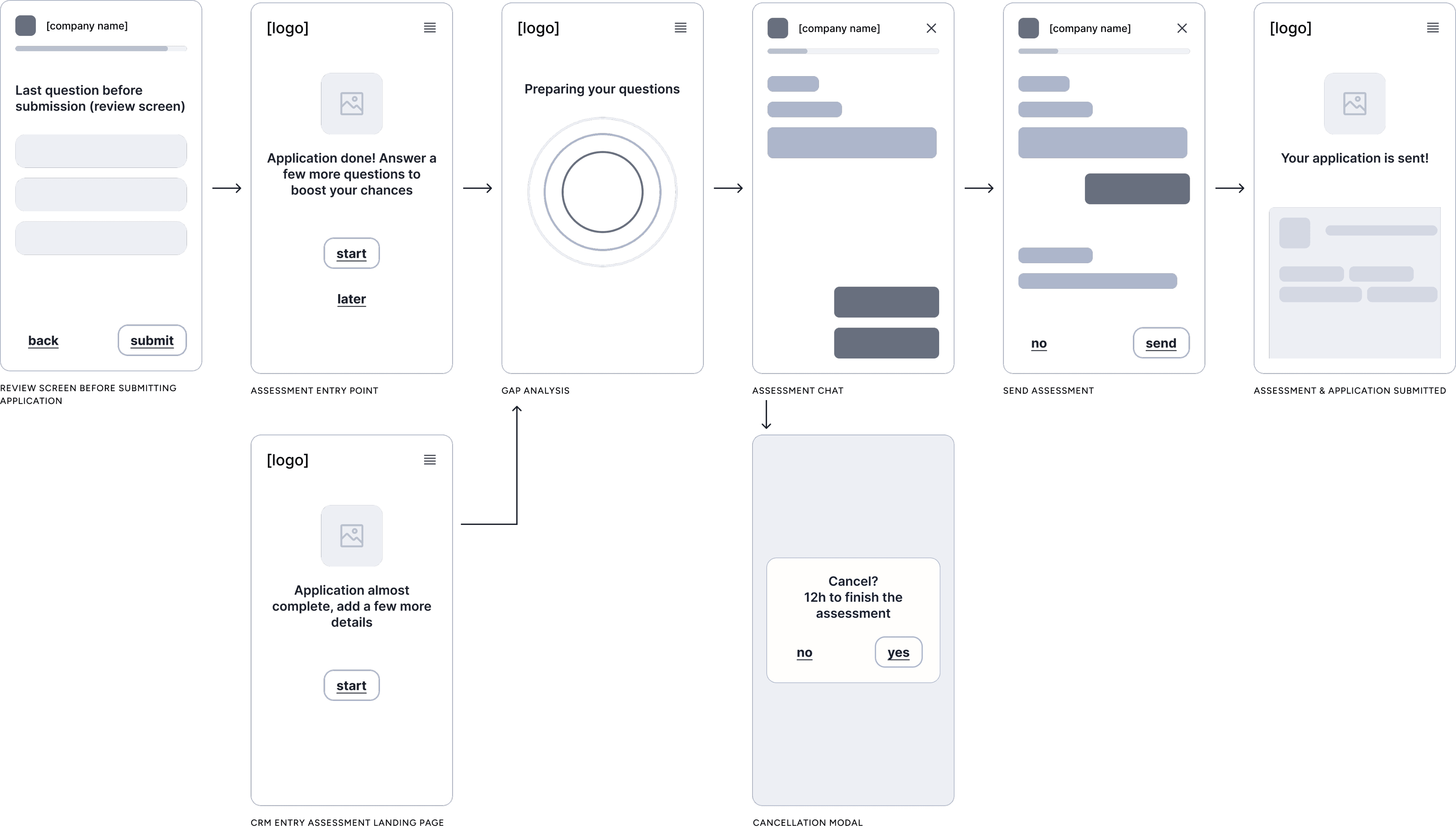
Wireframes were primarily used to align with stakeholders on the core flow and key touch-points - setting shared expectations before moving into detail. Multiple layout approaches were explored and discarded along the way as the interaction model took shape.
Interaction design & UI exploration

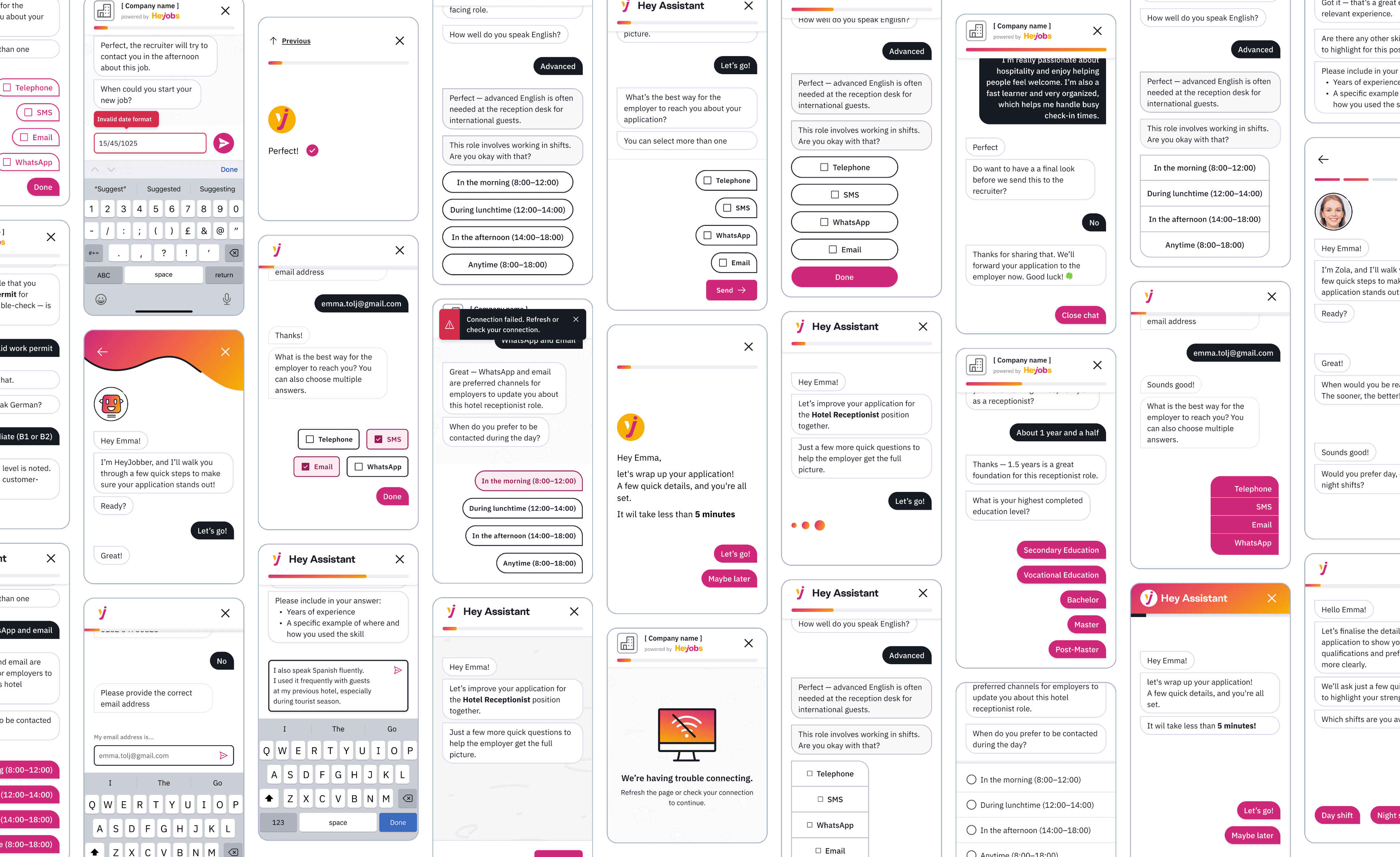
I iterated through multiple rounds, starting broad and getting progressively more specific. The first rounds focused on the overall chat flow - how questions appear, response formats, loading states (especially mimicking a natural typing feel), layout options, progress indicators, and general look and feel. Later rounds zoomed into the details of handling different question types - yes/no, single select, multi select, number input, date input, and free text.

Final rounds refined the finishing touches: background patterns and animations. Throughout, I worked independently and paired closely with front end team.
System components & Interactions

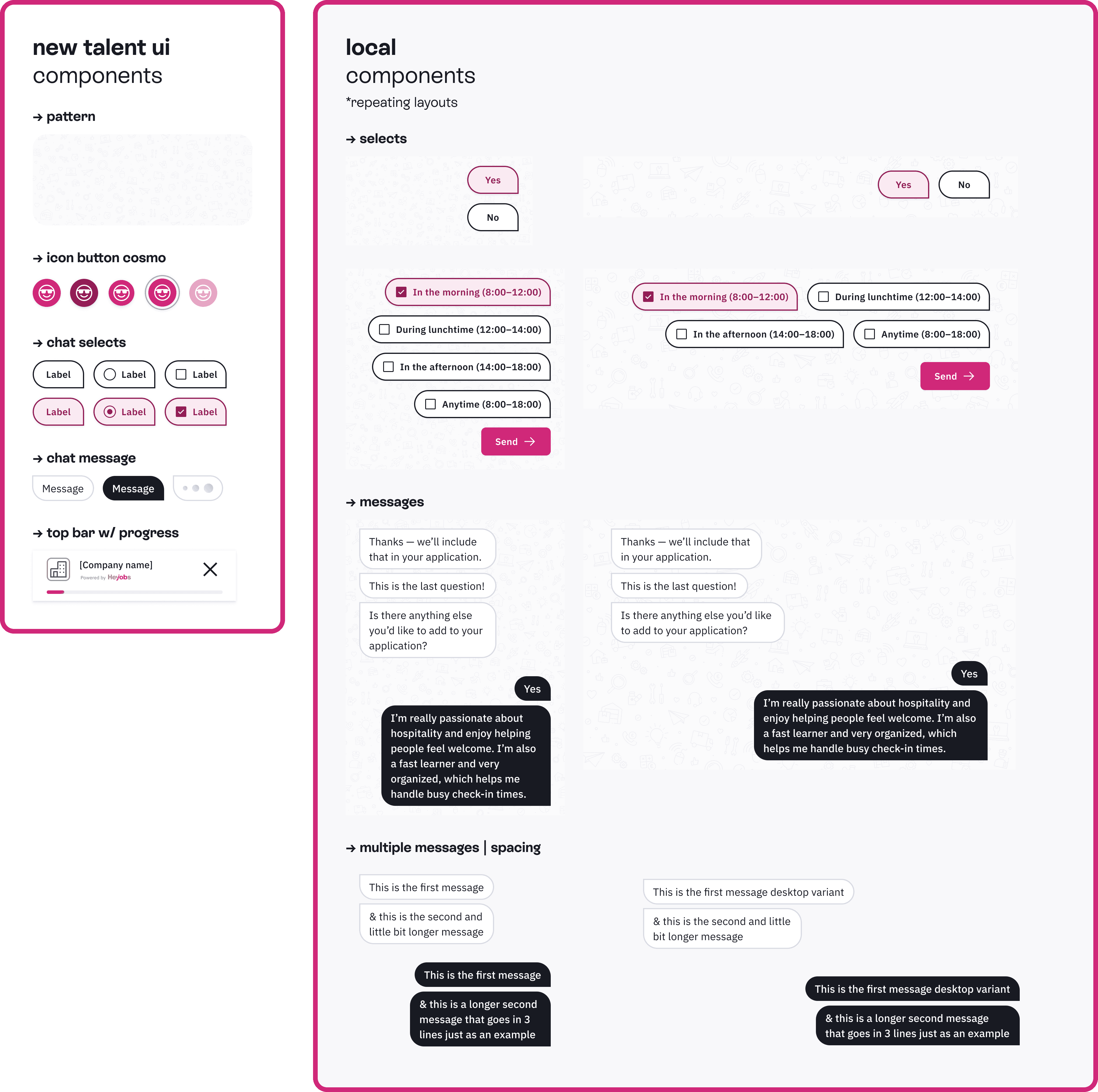
I paired closely with my engineering counterpart to figure out the best way to build the system for an intuitive, smooth experience. Rather than starting from scratch, we duplicated our existing select component and created a 'chat select' variant with different styling and slightly adjusted behaviour - prioritising consistency and maintainability. We added a new variant of the existing top bar that included a progress bar, and built new message components with black, white, and loading variants to differentiate between questions and answers. A lot of fine-tuning went into getting the animations right, mimicking a natural typing feel, ensuring text wrapped properly, and making the different layouts and patterns work together as a cohesive whole.
Constraints & Trade-offs

The AI backend was simultaneously the product's greatest asset and its primary design constraint.

The AI backend was simultaneously the product's greatest asset and its primary design constraint.

Latency masking
LLM response times were unpredictable, which created an immediate UX problem: silence that reads as broken. I worked with frontend engineering on a typing indicator and staggered delays to fill that dead time - standard practice for chat interfaces, but the timing and pacing needed tuning to feel right for a high-stakes candidate context rather than a casual chatbot.

No answer editing
The bigger risk was data integrity. Once an answer was submitted it couldn't be edited without corrupting conversation state - a single mis-tap could misrepresent a candidate's qualifications. This wasn't in the original scope, so I had to make the case for a confirmation screen late in the process. It shipped.

Scope creep & simplification
Scope creep was the harder problem. Stakeholders added answer options, industry terminology, and additional questions late in development. I pushed back and lost. The conversational flow started feeling like a form. Rather than ship something broken, I worked with engineering on patches - breaking long sequences into smaller steps, restructuring multi-option layouts - and we got it to functional. The justification for simplifying in V2 came from post-launch drop-off data, which showed exactly where candidates were abandoning the flow. We have the evidence - where the argument lands in the next cycle is still open.

Latency masking

The AI backend was simultaneously the product's greatest asset and its primary design constraint.

Latency masking
LLM response times were unpredictable, which created an immediate UX problem: silence that reads as broken. I worked with frontend engineering on a typing indicator and staggered delays to fill that dead time - standard practice for chat interfaces, but the timing and pacing needed tuning to feel right for a high-stakes candidate context rather than a casual chatbot.

No answer editing
The bigger risk was data integrity. Once an answer was submitted it couldn't be edited without corrupting conversation state - a single mis-tap could misrepresent a candidate's qualifications. This wasn't in the original scope, so I had to make the case for a confirmation screen late in the process. It shipped.

Scope creep & simplification
Scope creep was the harder problem. Stakeholders added answer options, industry terminology, and additional questions late in development. I pushed back and lost. The conversational flow started feeling like a form. Rather than ship something broken, I worked with engineering on patches - breaking long sequences into smaller steps, restructuring multi-option layouts - and we got it to functional. The justification for simplifying in V2 came from post-launch drop-off data, which showed exactly where candidates were abandoning the flow. We have the evidence - where the argument lands in the next cycle is still open.

LLM response times were unpredictable, which created an immediate UX problem: silence that reads as broken. I worked with frontend engineering on a typing indicator and staggered delays to fill that dead time - standard practice for chat interfaces, but the timing and pacing needed tuning to feel right for a high-stakes candidate context rather than a casual chatbot.

The AI backend was simultaneously the product's greatest asset and its primary design constraint.

Latency masking
LLM response times were unpredictable, which created an immediate UX problem: silence that reads as broken. I worked with frontend engineering on a typing indicator and staggered delays to fill that dead time - standard practice for chat interfaces, but the timing and pacing needed tuning to feel right for a high-stakes candidate context rather than a casual chatbot.

No answer editing
The bigger risk was data integrity. Once an answer was submitted it couldn't be edited without corrupting conversation state - a single mis-tap could misrepresent a candidate's qualifications. This wasn't in the original scope, so I had to make the case for a confirmation screen late in the process. It shipped.

Scope creep & simplification
Scope creep was the harder problem. Stakeholders added answer options, industry terminology, and additional questions late in development. I pushed back and lost. The conversational flow started feeling like a form. Rather than ship something broken, I worked with engineering on patches - breaking long sequences into smaller steps, restructuring multi-option layouts - and we got it to functional. The justification for simplifying in V2 came from post-launch drop-off data, which showed exactly where candidates were abandoning the flow. We have the evidence - where the argument lands in the next cycle is still open.

No answer editing

The AI backend was simultaneously the product's greatest asset and its primary design constraint.

Latency masking
LLM response times were unpredictable, which created an immediate UX problem: silence that reads as broken. I worked with frontend engineering on a typing indicator and staggered delays to fill that dead time - standard practice for chat interfaces, but the timing and pacing needed tuning to feel right for a high-stakes candidate context rather than a casual chatbot.

No answer editing
The bigger risk was data integrity. Once an answer was submitted it couldn't be edited without corrupting conversation state - a single mis-tap could misrepresent a candidate's qualifications. This wasn't in the original scope, so I had to make the case for a confirmation screen late in the process. It shipped.

Scope creep & simplification
Scope creep was the harder problem. Stakeholders added answer options, industry terminology, and additional questions late in development. I pushed back and lost. The conversational flow started feeling like a form. Rather than ship something broken, I worked with engineering on patches - breaking long sequences into smaller steps, restructuring multi-option layouts - and we got it to functional. The justification for simplifying in V2 came from post-launch drop-off data, which showed exactly where candidates were abandoning the flow. We have the evidence - where the argument lands in the next cycle is still open.

The bigger risk was data integrity. Once an answer was submitted it couldn't be edited without corrupting conversation state - a single mis-tap could misrepresent a candidate's qualifications. This wasn't in the original scope, so I had to make the case for a confirmation screen late in the process. It shipped.

The AI backend was simultaneously the product's greatest asset and its primary design constraint.

Latency masking
LLM response times were unpredictable, which created an immediate UX problem: silence that reads as broken. I worked with frontend engineering on a typing indicator and staggered delays to fill that dead time - standard practice for chat interfaces, but the timing and pacing needed tuning to feel right for a high-stakes candidate context rather than a casual chatbot.

No answer editing
The bigger risk was data integrity. Once an answer was submitted it couldn't be edited without corrupting conversation state - a single mis-tap could misrepresent a candidate's qualifications. This wasn't in the original scope, so I had to make the case for a confirmation screen late in the process. It shipped.

Scope creep & simplification
Scope creep was the harder problem. Stakeholders added answer options, industry terminology, and additional questions late in development. I pushed back and lost. The conversational flow started feeling like a form. Rather than ship something broken, I worked with engineering on patches - breaking long sequences into smaller steps, restructuring multi-option layouts - and we got it to functional. The justification for simplifying in V2 came from post-launch drop-off data, which showed exactly where candidates were abandoning the flow. We have the evidence - where the argument lands in the next cycle is still open.

Scope creep & simplification

The AI backend was simultaneously the product's greatest asset and its primary design constraint.

Latency masking
LLM response times were unpredictable, which created an immediate UX problem: silence that reads as broken. I worked with frontend engineering on a typing indicator and staggered delays to fill that dead time - standard practice for chat interfaces, but the timing and pacing needed tuning to feel right for a high-stakes candidate context rather than a casual chatbot.

No answer editing
The bigger risk was data integrity. Once an answer was submitted it couldn't be edited without corrupting conversation state - a single mis-tap could misrepresent a candidate's qualifications. This wasn't in the original scope, so I had to make the case for a confirmation screen late in the process. It shipped.

Scope creep & simplification
Scope creep was the harder problem. Stakeholders added answer options, industry terminology, and additional questions late in development. I pushed back and lost. The conversational flow started feeling like a form. Rather than ship something broken, I worked with engineering on patches - breaking long sequences into smaller steps, restructuring multi-option layouts - and we got it to functional. The justification for simplifying in V2 came from post-launch drop-off data, which showed exactly where candidates were abandoning the flow. We have the evidence - where the argument lands in the next cycle is still open.

Scope creep was the harder problem. Stakeholders added answer options, industry terminology, and additional questions late in development. I pushed back and lost. The conversational flow started feeling like a form. Rather than ship something broken, I worked with engineering on patches - breaking long sequences into smaller steps, restructuring multi-option layouts - and we got it to functional. The justification for simplifying in V2 came from post-launch drop-off data, which showed exactly where candidates were abandoning the flow. We had the evidence. Whether the argument lands in the next cycle is still open.

The AI backend was simultaneously the product's greatest asset and its primary design constraint.

Latency masking
LLM response times were unpredictable, which created an immediate UX problem: silence that reads as broken. I worked with frontend engineering on a typing indicator and staggered delays to fill that dead time - standard practice for chat interfaces, but the timing and pacing needed tuning to feel right for a high-stakes candidate context rather than a casual chatbot.

No answer editing
The bigger risk was data integrity. Once an answer was submitted it couldn't be edited without corrupting conversation state - a single mis-tap could misrepresent a candidate's qualifications. This wasn't in the original scope, so I had to make the case for a confirmation screen late in the process. It shipped.

Scope creep & simplification
Scope creep was the harder problem. Stakeholders added answer options, industry terminology, and additional questions late in development. I pushed back and lost. The conversational flow started feeling like a form. Rather than ship something broken, I worked with engineering on patches - breaking long sequences into smaller steps, restructuring multi-option layouts - and we got it to functional. The justification for simplifying in V2 came from post-launch drop-off data, which showed exactly where candidates were abandoning the flow. We have the evidence - where the argument lands in the next cycle is still open.

SOLUTION

The Experience

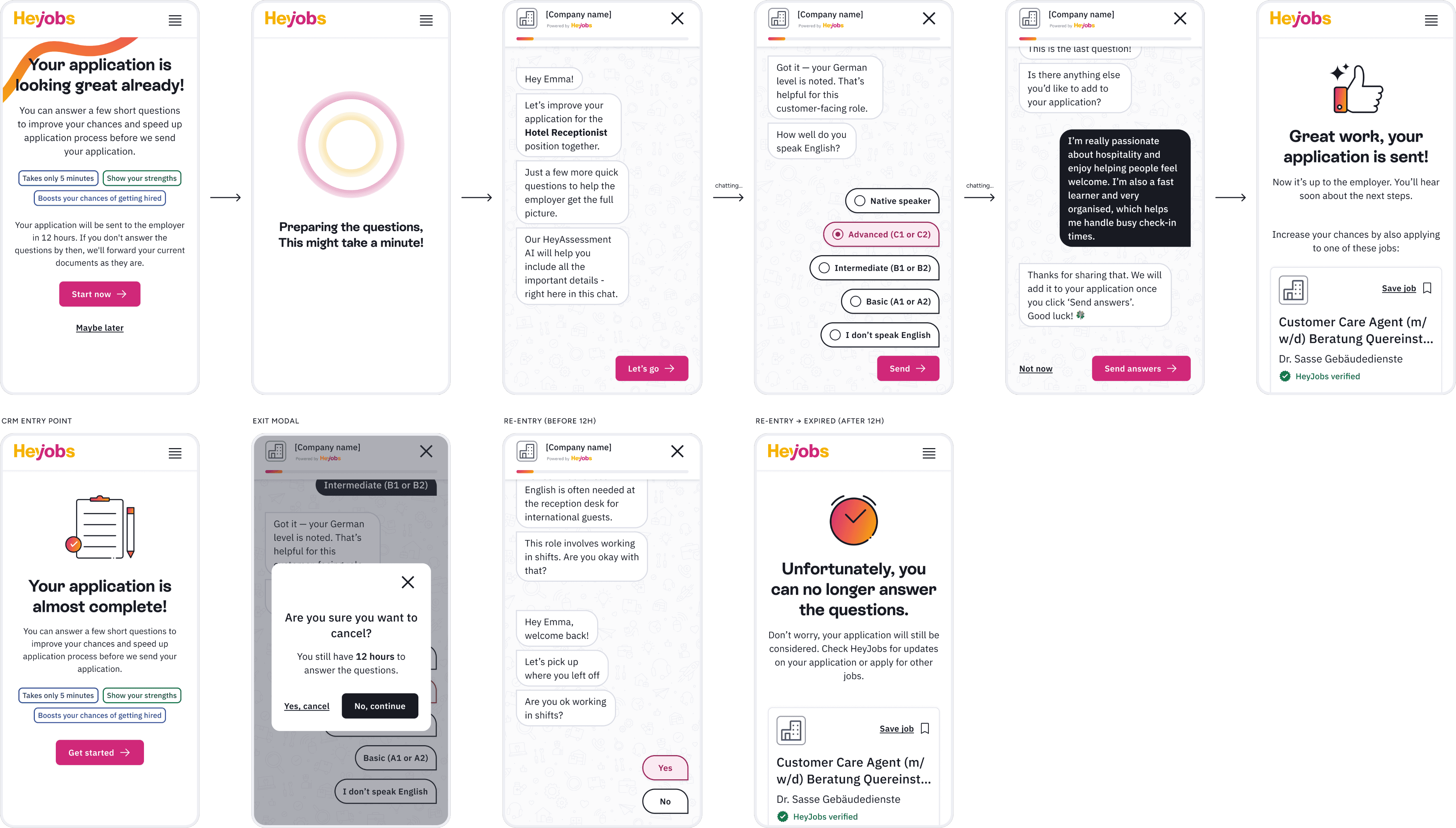
The final design guides candidates through a complete journey. It starts with a landing page that sets expectations: takes less than 5 minutes, highlights your skills, boosts your chances. A short loading screen then signals that the experience is tailored.

The chat opens with a welcome message that explains why the assessment is part of the application and reassures candidates that it is quick and relevant to the job. The conversation leads them through a small set of focused, role‑related questions. Interactions stay simple, mobile friendly, and predictable, so candidates always know what to do next.

After the last question, candidates receive a clear confirmation that everything is submitted. The final screen explains what happens next, who will see their responses, and how this step strengthens their application. The overall flow aims to feel straightforward, fair, and supportive, turning a typical test into a smooth way to show real ability.
IMPACT

Key Metrics & Results

Impact was measured through cohort analysis comparing applications with completed assessments against the baseline.

metric

impact

Interview rate

+50-57% (10.7% vs. 6.8% baseline)

Hire rate

+30-35% for completed assessments

Time to hire

Reduced by ~300h (~ 33 days → ~20 days) - 38% improvement

Recruiter response time

77h faster to first action (~10 days → ~7 days)

Completion rate

~81% of candidates who started completed it

metric

impact

Interview rate

+50-57% (10.7% vs. 6.8% baseline)

Hire rate

+30-35% for completed assessments

Time to hire

Reduced by ~300h (~ 33 days → ~20 days) - 38% improvement

Recruiter response time

77h faster to first action (~10 days → ~7 days)

Completion rate

~81% of candidates who started completed it

The data also revealed a telling signal: candidates who started but didn't complete the assessment had lower quality rates than the baseline. Completion was not only about data collection - it was a signal of candidate’s intent and fit.

© 2026 Elena Franković

© 2026 Elena Franković

© 2026 Elena Franković